The player from Poland requested to unblock his account to send verification documents but received a response stating that his account had been closed without the right to reopen and his balance had been cancelled. We reviewed the case and asked the casino for evidence that he had been properly requested to complete KYC and given a fair way to submit documents. The casino claimed documents had been requested by email and via the verification tab, but it did not provide sufficient supporting evidence and did not cooperate further. As a result, we closed the complaint as Unresolved because the casino had not shown that he had been given a reasonable opportunity to verify his account.
Betalright Casino - Player’s account has been closed and balance confiscated.
Unresolved
Our verdict
Justified complaint
Black points: 520
Amount: 1,900 zł

Betalright Casino
Safety Index 6.6 Above averageCase summary

Discussion
Public



Public
2 months ago
I asked the company to unblock my account so I could send the documents.After a month, I received this response.
We would like to inform you that your account did not pass the verification procedure on our website and has now been closed without the right to reopen as per T&C 5.3
Your balance has been cancelled as per T & C 9.4.
If you have any additional questions, please do not hesitate to contact us via email or via Live chat.
Best Wishes,
Financial Department
Public


Public
2 months ago
Important notice:
Casino Guru will never ask for payments or access to your accounts to complete KYC. If someone claims to be from Casino Guru and does that, do not share any information.
We only contact players through this official complaint thread or via @casino.guru e-mail addresses. Always check the sender’s domain and verify your complaint resolver’s e-mail address by clicking on their avatar visible inside the official complaint thread.
If anything seems suspicious, contact us directly.
Stay safe.
Public
Public
2 months ago
Hello,
Thank you very much for submitting your complaint. I’m sorry to hear about your negative experience with Betalright Casino.
Please allow me to ask you a few questions so I can better understand the situation.
- Could you please advise how long you were a player at the casino and when exactly your account was blocked?
- How did you learn about your account being blocked?
- What games did you play to accumulate your current balance in the casino? (slots, live games, betting on sports)
- Did you achieve your current balance with the help of a bonus?
- Could you please share with me your communication with the casino regarding the issue you refer to in your original post? Send emails or chat transcripts to my email at tomas@casino.guru, or post screenshots here
I hope we will be able to help you resolve this issue as soon as possible. Thank you very much in advance for your reply.
Best regards,
Tomas
Public
Public
2 months ago
Thanks for the detailed explanation.
- Could you please share with me your communication with the casino regarding the issue you refer to in your original post? Send emails or chat transcripts to my email at tomas@casino.guru, or post screenshots here
- Alternatively, send any other relevant evidence of the incident.
Thanks in advance for your cooperation.
Public
Public
2 months ago
Dear pampa123,
Thank you for your cooperation and for providing all the necessary information. I truly appreciate the time and effort you’ve taken to share everything with us so far.
Your complaint will now move to the next stage of our process and be handled by your dedicated Resolver, Michal (michal.k@casino.guru). This is a standard step in our procedure, as the Resolver will take over communication with the casino directly and manage your case from this point onward.
No action is required from you right now. Your Resolver will reach out through this thread if any additional details are needed. You can rest assured that your case is in very capable hands.
I wish you the best of luck and hope your case will be resolved to your satisfaction soon.
Kind regards,
Tomas
Public

Public
2 months ago
Hello pampa123,
It's Michal again. I have taken over this complaint and have reviewed your case. I will now contact the casino to shed further light on this matter and to see if there is any way I can assist.
I would like to invite Betalright Casino to join the conversation.
Dear Betalright Casino,
Could you kindly clarify the reason why the player did not pass the verification procedure?
We would also appreciate it if you could provide any relevant supporting evidence regarding the player's failure to pass the verification procedure and the closure of their account. Should you prefer to share such information privately, please feel free to send it directly to me via email at michal.k@casino.guru for an independent review.
Public

Public
2 months ago
Dear all,
thank you for reaching out to us.
We are currently checking the case with our relevant department. Once there is update you will be informed accordingly.
Thank you for the understanding!
Best Regards,
Team Betalright
Public
Public
1 month ago
Dear Betalright Team,
Thank you for your response. We would greatly appreciate it if you could provide the requested clarification, along with any relevant supporting evidence, at your earliest convenience.
We look forward to your cooperation in clarifying this matter.
Public
Public
1 month ago
Dear all,
thank you for the patience.
Please note that documents were initially requested on 19.05.2026 via the verification tab on teh website and via e-mail. Nothing was provided. A reminder was sent on 08.07.2026 via e-mail. Again nothing was provided. As a result, account has been closed as per our Terms and Conditions which were agreed by the customer when he created the account:
5.3 You must provide these documents and information within 30 (thirty) days after the request is made. We reserve the right to withhold payment and/or suspend your account until you provide the documents and information we requested, and to permanently close your account if you fail to do so in time. We will usually verify your documents and information within 10 (ten) days after our request is answered in full, however, depending on the circumstances and complexity of a given case, additional time and/or checks may be required to complete verification.
Balance was deducted based on Terms and Conditions:
9.4 Should we arrive at a reasonable suspicion that you have engaged in a fraud, any illegal or improper activity, or have otherwise breached the Terms, we reserve the right to take any number of the following action, at our sole and absolute discretion, with or without notice:
immediately block your account and suspend your access to the Website and/or its services, suspend all pending withdrawal requests and other payments to you for the period of investigation;
permanently close your account with the Website and all other partner websites on our platform and deny any future use of the Website and the partner websites;
void any winnings obtained, cancel any pending withdrawals and confiscate the real money balance of your account;
void any bonus balance on your account and/or limit your future participation in our bonus and promotional offers or deny them to you;
contact the relevant authorities to inform them of any suspected illegal activity and/or to collect any payments that you owe to the Company.
We hope this clarifies the matter.
Best Regards,
Team Betalright
Public
Public
1 month ago
Dear Betalright Team,
Thank you for the clarification provided.
Could you please forward the relevant evidence showing the requests made to the player to provide the requested documents? You may send the evidence directly to me at michal.k@casino.guru for an independent review.
Thank you in advance.
Dear pampa123,
Could you please clarify why you have not yet provided the requested documents to the casino?
If you believe that you have provided the documents within the expected timeframe, please provide any relevant evidence confirming when and how they were submitted to the casino.
Thank you.
Public
Public
1 month ago
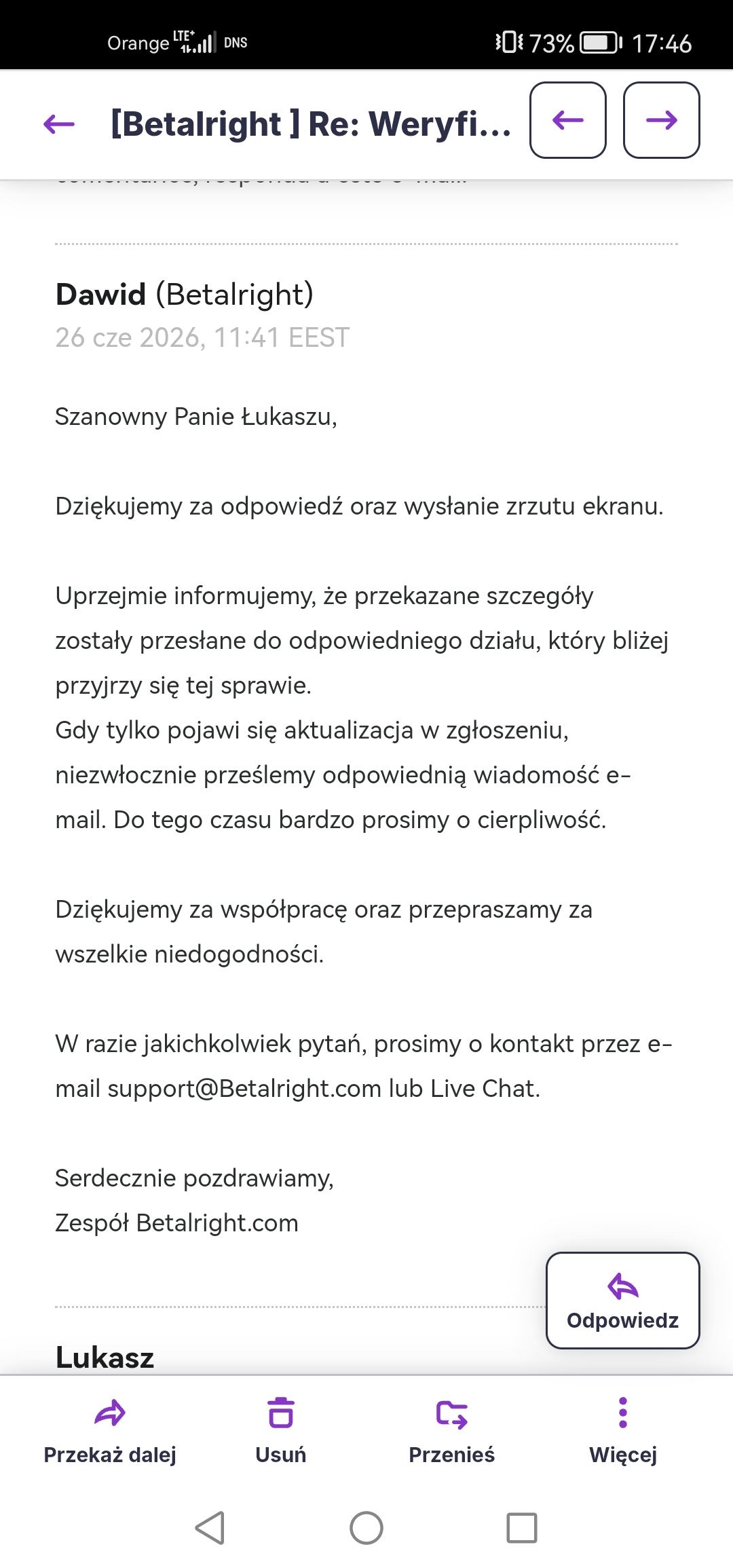
The casino promised me I could upload the documents via the website, but my account remained blocked the whole time; I am attaching a screenshot of the email.
On July 8th, I was asked to upload documents via their website. How was I supposed to do that when my account was blocked?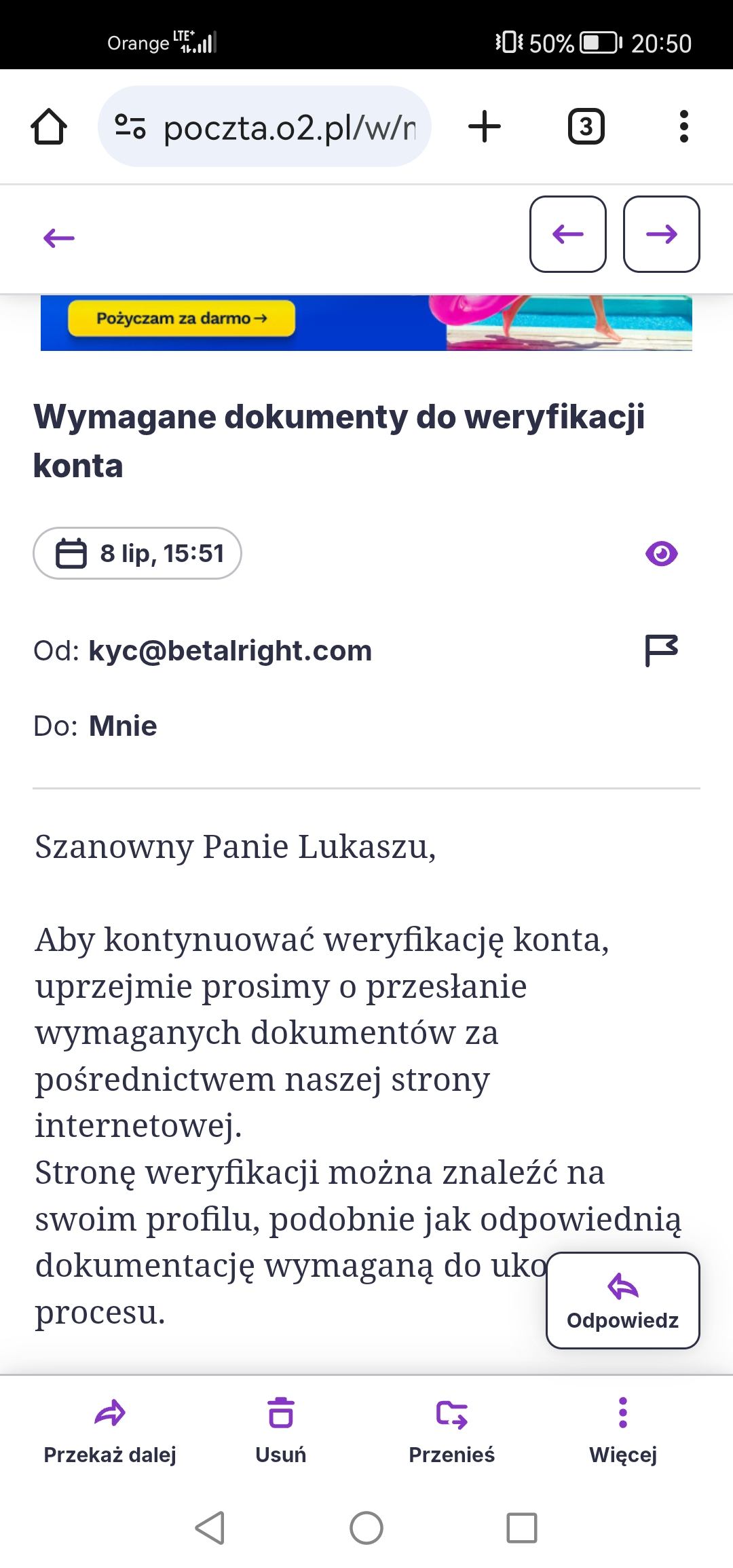
I didn't receive a reply to my email asking for the option to attach documents.
Public
Public
1 month ago
Dear pampa123,
Thank you for your response; however, the screenshots you provided do not entirely clarify the situation.
Please forward me the full email thread/exchange (not screenshots) you had or have with the Betalright Casino team in its original form for a review at michal.k@casino.guru
Public
Public
1 month ago
Dear pampa123,
Thank you for your email. However, I would like to clarify that I specifically requested the full email correspondence you have had with the Betalright Casino team in its original form, rather than screenshots.
For the purposes of an independent review, I require the actual email messages and the complete correspondence thread, including the original message details, rather than "just" screenshots.
Kindly provide the relevant correspondence in its original format so that it can be properly reviewed and assessed.
Thank you for your cooperation.
Public
Public
1 month ago
Dear pampa123,
Thank you for your email. However, the correspondence you provided contains only a single message and does not demonstrate the multiple exchanges with Betalright Casino that are shown in the screenshots you previously provided.
Therefore, as requested in my previous email, please provide the complete email correspondence between you and Betalright Casino, including both incoming and outgoing messages, in their original and unedited form. Please do not remove, modify, or otherwise alter any part of the correspondence.
I look forward to your prompt response.
Sensitive attachment
Sensitive attachment
1 month ago
I can't send 15 emails at once because your email system is rejecting them
Public
Public
1 month ago
Dear pampa123,
Please note that, as is quite clearly visible from the screenshot, the error you encountered originated from your email provider, not from our system.
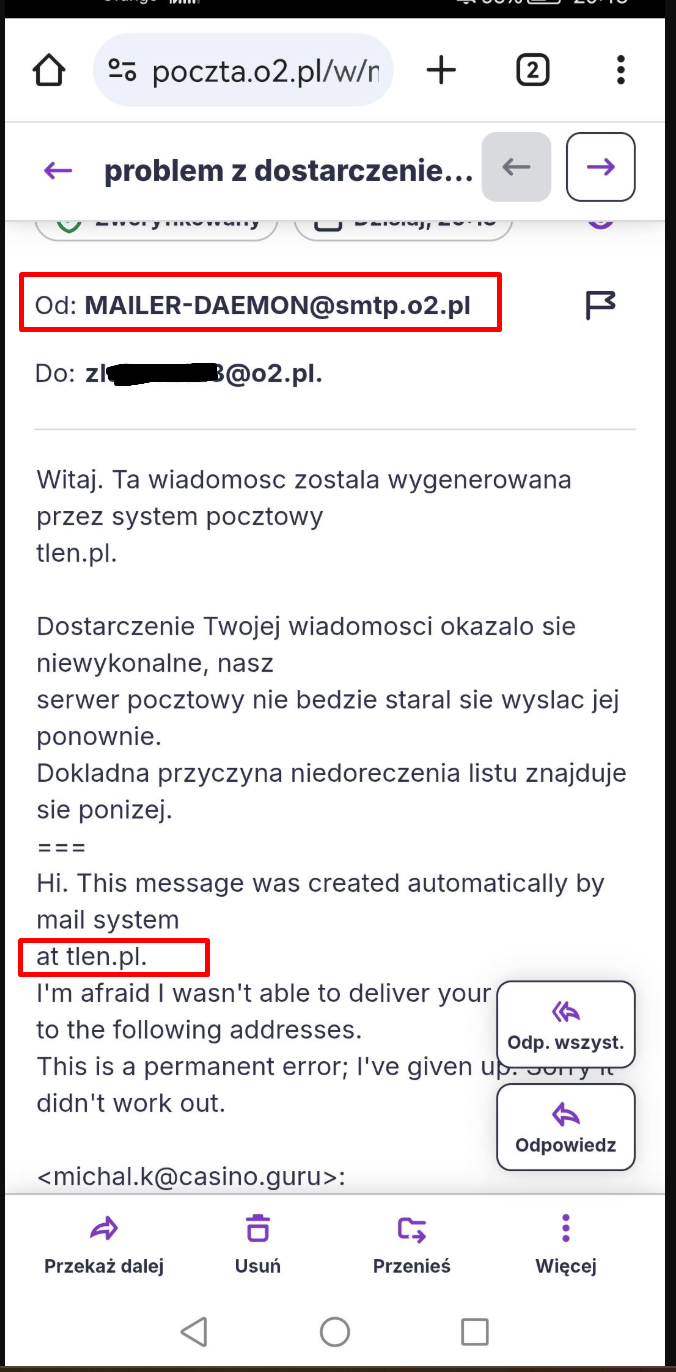
If you are unable to forward the entire email thread at once, which is quite unusual, although there could indeed be some limitation on your email provider's side, please forward the emails individually instead. Please ensure that each email is provided in its original and unedited form, without removing, modifying, or otherwise altering any part of the correspondence.
Public
Public
1 month ago
Dear pampa123,
I have still not received the requested emails. Please forward them to me at your earliest convenience so that we can proceed with your case.
Public
Public
1 month ago
Dear pampa123,
Your previous emails were delivered to us successfully. It is therefore quite strange why these particular important emails cannot be forwarded to me.
My email address, michal.k@casino.guru, has no restrictions, and I receiving messages from players, casinos, regulatory authorities or other entities from all around the world on a daily basis. Please check with your email provider to determine why your messages could not be delivered.
Public
Public
1 month ago
Dear pampa123,
I have now successfully received messages from your zl*******123@tlen.pl and m****k123@gmail.com email addresses, although the email from zl*******123@tlen.pl came empty.
This, however, further confirms that the error you previously encountered originated from your email provider.
Dear Betalright Casino,
The emails I have received from the player support their claim that they have informed your team of their inability to access their casino account. As a result, the player had no means of submitting the required documents through their account. Furthermore, despite the player's request, no alternative option for submitting the documents via email was provided.
Kindly forward the evidence I've already requested from you to support your claim that the player has not answered your requests.
Public
Public
1 month ago
Dear All,
We are writing to let you know that we are currently investigating the matter alongside with the relevant department. We want to ensure a thorough review is conducted to provide you with an accurate resolution.
We will notify you as soon as we have further updates or a final outcome. Thank you for your continued patience in the meantime.
Best regards,
Betalright Casino Team
Public
Public
3 weeks ago
Dear Betalright Casino,
I look forward to receiving the information and supporting evidence you can provide, which should enable me to conduct an independent assessment of the matter.
Public
Public
2 weeks ago
Dear all,
thank you for the patience.
As previously mentioned - the documents were initially requested on 19.05.2026 via the verification tab on the website and via e-mail. Nothing was provided. A reminder was sent on 08.07.2026 via e-mail. Again nothing was provided. The customer can only send these documents from the email used for registration of the account. We cannot bypass our own Terms and Conditions.
The decision from our relevant department regarding the account closure and balance void is final.
We hope this clarifies the matter.
Best Regards,
Team Betalright
Public
Public
2 weeks ago
Please explain why you blocked my account when you were sending emails asking me to upload documents via your website; I reported this to you repeatedly, yet no one even replied regarding the matter.
Public
Public
2 weeks ago
Dear Betalright Casino Team,
I fully understand that players are required to provide the necessary documentation for KYC and/or AML verification within an established timeframe.
However, as previously mentioned, I have received emails supporting the player’s claim that they informed your team that they could not access their casino account. Consequently, the player had no means of submitting the requested documents through the account. Despite asking for assistance, they were apparently not offered an alternative submission method, such as providing the documents securely by email.
Furthermore, I have not yet received the evidence previously requested to substantiate your position that the player failed to respond to your verification requests.
Based on the information currently available, I must agree with the player that they were not given a reasonable opportunity to provide the required documents. Therefore, the assertion that the player failed to comply with the verification requirements has not been sufficiently supported.
I kindly ask that you provide the player with a reasonable opportunity and an appropriate secure channel through which to complete the KYC verification.
Public
Public
2 weeks ago
Dear player ,
We kindly inform you that on 19/05/2026, we informed you in our e-mail that in case there is an issue to provide documents through forum, you may provide them via e-mail to our support team.
Thank you for your understanding.
Best regards,
Betalright Team
Public
Public
1 week ago
Stop lying; I have emails confirming that I need to upload this via the website.
Sensitive attachment
Sensitive attachment
1 week ago
Translation

Dear Betalright Casino,
the player has provided me with this email exchange with your team:
David (Betalright)
Jun 26, 2026, 11:41 EEST
Dear Mr. Łukasz,
Thank you for your reply and sending the screenshot.
We would like to inform you that the details provided have been forwarded to the appropriate department, which will take a closer look at the matter.
We'll send you an email as soon as there's an update to your report. Until then, we appreciate your patience.
Thank you for your cooperation and we apologize for any inconvenience.
If you have any questions, please contact us by email support@Betalright.com or Live Chat.
Best regards,
Betalright.com Team
Lukasz
Jun 26, 2026, 10:25 EEST
Please
On June 26, 2026, 09:21 Support Betalright < support@betalright.com > wrote:
O seu pedido (51361724) foi actualizado. Para adicionar comentários, responda a este e-mail.
David (Betalright)
Jun 26, 2026, 10:21 EEST
Dear Mr. Łukasz,
Thank you for your reply.
We sincerely apologize for this situation. Could you please resend a screenshot of the message you see when you try to log in? We will forward this matter to the appropriate department.
Thank you for your cooperation.
If you have any questions, please contact us by email support@Betalright.com or Live Chat.
Best regards,
Betalright.com Team
Lukasz
Jun 26, 2026, 09:14 EEST
done, still can't log in, same error
On June 23, 2026, 17:11 Support Betalright < support@betalright.com > wrote:
O seu pedido (51361724) foi actualizado. Para adicionar comentários, responda a este e-mail.
Maja (Betalright)
Jun 23, 2026, 6:10 PM EEST
Dear Mr. Lukasz,
Thank you for contacting Betalright Customer Service.
We kindly ask you to follow the steps below and log in to your account using incognito mode in your web browser.
If you continue to receive the same message, please try logging in using a different device.
If the steps you have taken do not work, please provide a screenshot of your incognito mode along with this message and we will find other solutions to speed up the process.
Tip on how to clear browser history: To do this, please open Google Chrome and follow these steps:
1. Open the Chrome app;
2. In the upper right corner, click More (three vertical dots).
3. Click History > Clear browsing data;
4. At the top, select a time range. To delete everything, select "From the beginning";
5. Check the boxes for "Cookies and site data" and "Cached images and files."
6. Click "Clear data".
7. Restart your device and visit the website again.
- Please also make sure that pop-up windows in Chrome are enabled for our website. A tip on how to check this is in the link below: https://support.google.com/chrome/answer/95472?hl=pl&co=GENIE.Platform%3DDesktop
If you have any questions, please contact us by email support@Betalright.com or Live Chat.
Best regards,
Betalright.com Team
Lukasz
Jun 23, 2026, 5:52 PM EEST
I have the same message as last time, I have to send it many times and please reply sooner and not after a week.
On June 23, 2026, 02:17 AM Support Betalright < support@betalright.com > wrote:
O seu pedido (51361724) foi actualizado. Para adicionar comentários, responda a este e-mail.
Saandra (Betalright)
Jun 23, 2026, 03:17 EEST
Dear Mr. Łukasz,
Thank you for contacting Betalright Customer Service.
First of all, we sincerely apologize for the delay in responding to your request - we are extremely sorry about the situation that has arisen.
To resolve difficulties with adding documents to your account, we recommend that you perform the following steps:
- Use the latest version of Google Chrome
- Clear your browser cache and cookies (link with instructions: https://support.google.com/accounts/answer/32050?hl=pl&co=GENIE.Platform%3DDesktop )
- Make sure pop-up windows are enabled (link with instructions: https://support.google.com/chrome/answer/95472?hl=pl&co=GENIE.Platform%3DDesktop )
- Try opening the website in incognito mode
- Try using a different device and/or browser
If after trying all the steps above the situation is still not resolved, please contact us again with a screenshot of what is happening and/or the error message you received and we will be happy to look into it further.
If you have any questions, please contact us by email support@Betalright.com or Live Chat.
Best regards,
Betalright.com Team
Lukasz
Jun 22, 2026, 7:38 PM EEST
Will I get an answer or will I die first????
On June 10, 2026, 1:47 PM Support Betalright < support@betalright.com > wrote:
O seu pedido (51361724) foi actualizado. Para adicionar comentários, responda a este e-mail.
Laila (Betalright)
Jun 10, 2026, 2:46 PM EEST
Dear Mr. Łukasz,
Thank you for contacting Betalright Customer Service.
Thank you for the screenshot you provided, and we apologize for the inconvenience. Please be advised that the details you provided have been forwarded to the appropriate department for further investigation. We will immediately send you an email as soon as there is an update to your report.
Until then, we kindly ask for your patience.
If you have any questions, please contact us by email support@Betalright.com or Live Chat.
Best regards,
Betalright.com Team
Lukasz
Jun 9, 2026, 6:36 PM EEST
I can't log in at all, I won't send documents by email, please unblock the account, I'm sending a screenshot
On June 9, 2026, 03:22 Support Betalright < support@betalright.com > wrote:
O seu pedido (51361724) foi actualizado. Para adicionar comentários, responda a este e-mail.
Iga (Betalright)
Jun 9, 2026, 04:22 EEST
Dear Mr. Łukasz,
Thank you for contacting Betalright Customer Service.
We sincerely apologize for the misunderstanding. It was absolutely not our intention to mislead you. We want to help you as quickly as possible, so we're committed to determining the exact cause of the problem.
Please let us know where you're experiencing difficulties so we can investigate further. Thank you in advance.
If you have any questions, please contact us by email support@Betalright.com or Live Chat.
Best regards,
Betalright.com Team
Lukasz
Jun 8, 2026, 7:45 PM EEST
I CAN'T, if I could, I wouldn't ask you why you lie
On June 5, 2026, 11:50 AM Support Betalright < support@betalright.com > wrote:
Milla (Betalright)
Jun 5, 2026, 12:50 PM EEST
Good morning Mr. Łukasz,
Thank you for contacting us.
We would like to inform you that you can submit the required documents for verification directly via the "Account" → "Verification" tab after logging in to your account.
Once you submit your documents, the appropriate department will review them as soon as possible.
If you have any questions, please contact us by email support@Betalright.com or Live Chat.
Best regards,
Betalright.com Team
This email was sent from your Betalright account. Provided by Zendesk
[WX19YK-N4N03]
Attachments
While the player may not have responded immediately to your email of 19 May 2026, he did reach out to your support team on at least 5 June 2026. As is apparent from the exchange, from that point onward the player was not adequately offered an alternative means of providing his documents for KYC verification — instead, he repeatedly reported issues with his account.
I have not yet received the evidence previously requested to substantiate your position that the player failed to respond to your verification requests.
Based on the information currently available, I must agree with the player that he was not given a reasonable opportunity to provide the required documents. The assertion that the player failed to comply with the verification requirements has therefore not been sufficiently supported.
I kindly ask that you provide the player with a reasonable opportunity and an appropriate secure channel through which to complete the KYC verification.
Public
Public
1 week ago
We would like to ask the casino to reply to this complaint. We are extending the timer by 7 days. If the casino fails to respond in the set time frame, we will close the complaint as ‘unresolved’ which may negatively affect its rating.
Public
Public
2 days ago
Dear pampa123,
Unfortunately, I have not received any further response from the casino. As the casino team has not provided the cooperation needed to move this matter forward, I must close your complaint as Unresolved.
Based on the information and evidence available, the casino has not sufficiently substantiated its actions or explained why you have not been given a reasonable opportunity to complete the KYC verification process. Under these circumstances, we cannot consider its handling of your case fair or justified.
I understand that this outcome does not resolve your situation. However, this unresolved complaint will negatively affect the casino’s Safety Index rating, which may encourage the casino to reconsider its approach. Should the casino resume reasonable cooperation, we can reopen your complaint, and you will be notified by email.
Normally, I would recommend escalating your complaint to the casino’s designated alternative dispute resolution (ADR) service or licensing authority. However, based on the information available to us, Betalright Casino does not hold a valid, recognised gaming licence or identify an ADR service. We therefore cannot direct you to a relevant gambling regulator or ADR provider for further assistance.
You may wish to seek independent legal advice in your jurisdiction to explore whether any further remedies are available. Assessing or pursuing legal action, however, falls outside the scope of our complaint resolution service.
Regrettably, this is where any potential assistance from our end concerning your case concludes.
I'm sorry that we were unable to assist you further in this instance.
Best regards,
Michal
Casino Guru